01
Requirement intelligence
Find ambiguity, missing acceptance criteria, and hidden risk before they become expensive defects.
Learn more ↗From first requirement to release confidence, connect test coverage, execution progress, and risk in one AI-powered quality workflow.
Quality work is scattered across documents, tickets, test suites, and dashboards. Quality At AI connects it all—so teams can see what matters and act sooner.
Explore the workspace →Find ambiguity, missing acceptance criteria, and hidden risk before they become expensive defects.
Learn more ↗Create structured, traceable test cases from requirements in seconds—not hours.
Learn more ↗See coverage, risk, and readiness in one decision-ready quality score.
Learn more ↗Explore the areas in your application's left-hand menu and see where each part of the quality workflow lives.
Move between team workspaces and keep each project's quality work organized in its own place.
See the plan attached to a workspace and understand the limits available to your team.
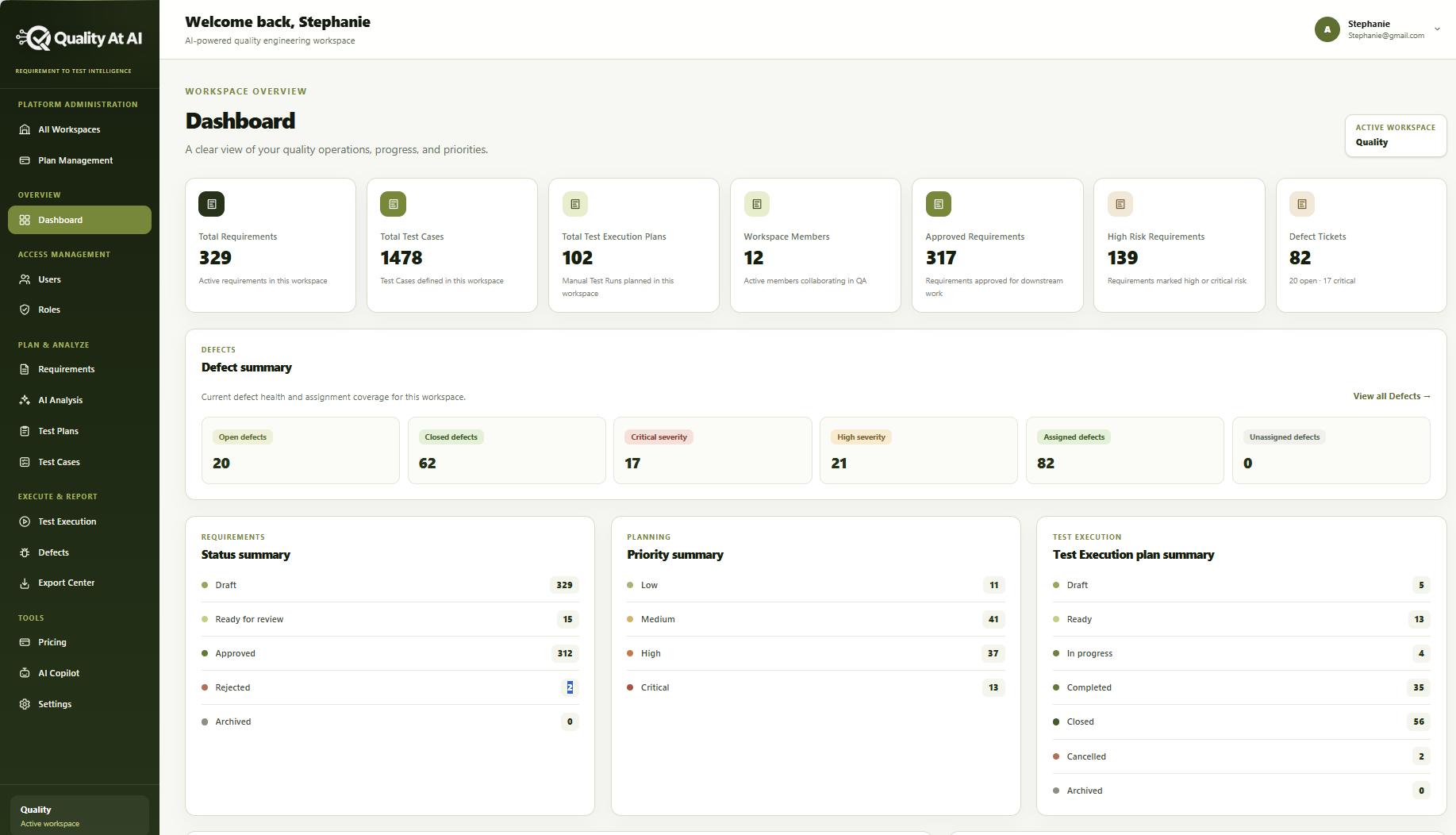
Get a real-time view of your entire quality workflow—from requirements and test coverage to execution progress, risks, and defects.
The Quality At AI dashboard brings your most important QA metrics together in one workspace, helping product, engineering, and quality teams identify gaps, prioritize risk, and make confident release decisions.
Instantly see the total number of requirements, approved requirements, generated test cases, and planned test executions. Understand whether every product requirement has sufficient testing coverage before development or release.
Identify high-risk and critical requirements early. Priority summaries help teams focus their testing effort on the areas most likely to affect users, business operations, or release quality.
Monitor open, closed, critical, high-severity, assigned, and unassigned defects from one place. Quickly understand current defect health and navigate directly to the complete defect list for investigation.
Track requirements as they move through draft, review, approval, rejection, and archival stages. Give every stakeholder a clear view of what is ready and what still requires attention.
Monitor test execution plans across draft, ready, in-progress, completed, closed, cancelled, and archived states. See testing progress without switching between multiple tools or reports.
View active workspace members, access the correct quality workspace, and keep administrators, QA engineers, product managers, and developers aligned around the same information.
Turn scattered quality data into clear, release-ready decisions with Quality At AI.
See and manage the people who can work in your quality workspace.
Control what each team member can view, create, review, or administer.
Keep product expectations and acceptance criteria together, with a clear review status for each requirement.
Find ambiguous wording, missing criteria, and potential risk before writing tests.
Organize what needs testing for a feature or release, including its scope and priorities.
Maintain the individual checks that verify expected behavior and trace them back to requirements.
Plan test runs, record outcomes, and see which checks are ready, in progress, or complete.
Track issues by severity, assignment, and status so the team knows what still needs attention.
Prepare quality information to share with people outside the workspace.
Compare plan capacity and choose the level that fits your team and testing volume.
Get in-context help as you work through quality questions and next steps.
Adjust workspace preferences and configuration in one place.
Capture → Analyze → Generate → Plan → Execute → Decide. Keep the context between every step.
Explore the features →Bring requirements and acceptance criteria into a shared workspace.
Review ambiguity, missing criteria, and areas that deserve closer attention.
Turn requirements into structured cases that the team can review and edit.
Organize cases into plans and prioritize the work for a release.
Run tests, record outcomes, and connect defects to the work behind them.
Use coverage, progress, and risk to make a better-informed release decision.
The dashboard brings the signals behind your next quality decision into one view. Explore the areas highlighted below.
Requirements, test cases, execution plans, and members in one overview.
See what is drafted, under review, approved, or still needs attention.
Spot high-risk requirements and focus on the most important work.
Follow plans from ready through in progress and completed.
Review open issues, severity, and assignment coverage.
Move from product intent to release readiness without losing the context between steps.
Bring requirements, test coverage, execution progress, risks, and defects into one workspace view.
Explore DashboardReview requirements and acceptance criteria, surface ambiguity, and maintain the connection to testing.
Explore RequirementsCreate and review traceable test cases so teams can verify the behavior that matters.
Explore Test CasesOrganize test scope into plans, track execution status, and see results and progress in context.
Explore Test ManagementFollow issues by severity, status, and assignment while keeping their requirement and test context close.
Explore DefectsUse contextual AI assistance to explore quality questions, summarize findings, and keep decisions in human hands.
Explore AI CopilotGive QA, product, engineering, and project teams a useful view of the same work—without losing the details each role needs.
Keep requirements, test cases, execution, and defects connected as work moves forward.
Explore solution Product teamsSee acceptance criteria, review status, and product risk before gaps reach release.
Explore solution Engineering leadersUnderstand priority risks and quality progress in a single shared view.
Explore solution Project managersFollow ownership, planning status, blockers, and progress across the workspace.
Explore solutionStart with the essentials, then increase capacity as your team and test coverage grow. All paid prices are shown in USD.
Core QA planning for small teams getting started.
Expanded limits for growing QA teams.
Higher limits and AI Copilot access for established QA organizations.
A sales-managed plan with configurable limits, support, and billing terms.
Explore the topics and reusable materials that help teams plan, test, and release with confidence.
Practical reading on requirements, test design, traceability, risk, and release readiness.
ExploreEditable starting points for test plans, test cases, traceability matrices, and release checklists.
ExploreCustomer-approved workflows and measurable outcomes when verified stories are available.
ExploreExplore product walkthroughs, feature explanations, and answers to common questions.
ExploreEverything you need to know before bringing AI into your quality workflow.
It complements your current stack. Keep the tools your team trusts while Quality At AI connects requirements, test coverage, and release risk in one workflow.
You can work with user stories, acceptance criteria, product specifications, and structured requirement documents across web, mobile, and API products.
Yes. Every generated scenario stays editable and traceable to its source requirement, so reviewers keep full control.
The product supports team workspaces, roles, and shared visibility. Contact the team to discuss the needs of a larger organization.
Turn your next set of requirements into a smarter quality plan with Quality At AI.